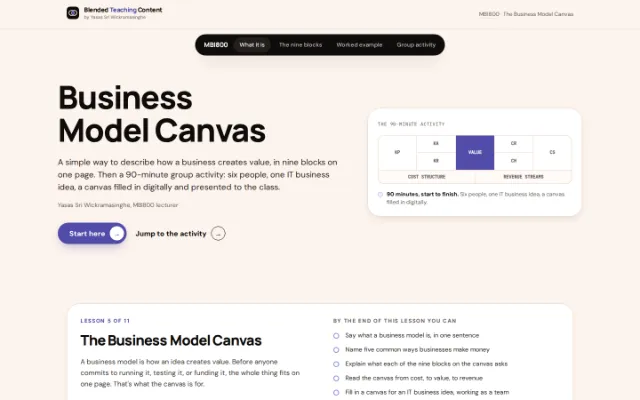
This is the written version of The Business Model Canvas, taken from the lesson itself. The simulations, drag-and-drop activities and quizzes only work in the interactive lesson.
A business model is how an idea creates value. Before anyone commits to running it, testing it, or funding it, the whole thing fits on one page. That's what the canvas is for.
Reading 15 minutes Assumes nothing Then a 90-minute group activity
By the end of this lesson you can
- Say what a business model is, in one sentence
- Name five common ways businesses make money
- Explain what each of the nine blocks on the canvas asks
- Read the canvas from cost, to value, to revenue
- Fill in a canvas for an IT business idea, working as a team
- Present a short slide deck clearly, in about five minutes
Start hereWhat a business model actually is
Five patterns cover most of the businesses you already know.
A business model describes how an idea will create value. That definition is deliberately broad — it applies just as well to a company as it does to a class project. Most revenue models fall into a small number of recognisable patterns, and naming the pattern is often the fastest way to understand an unfamiliar business.
| Model | How it works | Example |
|---|---|---|
| Product & service sales | The customer pays directly for a good or a service | Automotive manufacturers |
| Subscription | The customer pays a recurring fee for ongoing access | Mobile carriers, streaming services |
| Ad revenue | Advertisers pay for access to the platform’s audience | |
| Commission | The platform takes a cut of the transactions it facilitates | Kickstarter |
| Freemium | Basic use is free; advanced features are paid | Skype |
Worth asking
When you meet an unfamiliar company, ask which of these five patterns it's actually running — and whether it could be running more than one at once. A lot of platforms blend two, like a freemium product that also carries ads.
The toolNine blocks, one page
Cost on the left. Revenue on the right. Value in the middle.
1. Key Partners
Who do you need on your side?
2. Key Activities
What will you spend most of your time doing?
3. Key Resources
What do you need to make it work?
4. Value Proposition
What value does this create, and for whom?
5. Customer Relationships
What kind of relationship do customers expect?
6. Channels
How do people hear about you, and buy?
7. Customer Segments
Who is actually paying you?
8. Cost Structure
What does this cost to run?
9. Revenue Streams
How do you make money — and is there value beyond money?
Read it left to right: the left-hand blocks and Cost Structure describe what the model costs to run. The right-hand blocks and Revenue Streams describe what it earns, and from whom. Value Proposition sits in the middle because everything else on the page exists to support it.
Seeing it filled inA worked example: a bill-splitting app
Before you fill one in yourselves, here's what a completed canvas actually looks like.
Not every canvas needs a billion-dollar company behind it. Here's one for a small, ordinary app — easy to check against your own experience, and the same kind of IT idea your team will pick.
| Block | Filled in |
|---|---|
| Value Proposition | Split a shared bill in seconds, then get everyone reminded automatically until they’ve paid. |
| Customer Segments | Groups of friends, flatmates, and people who travel together. |
| Channels | The app itself, word of mouth, a listing in the App Store and Google Play. |
| Customer Relationships | Self-service — no support needed once it works. A help page for the rare question. |
| Revenue Streams | Free for small groups. A small monthly subscription for unlimited groups and spreadsheet export. |
| Key Activities | Building and maintaining the app, fixing bugs, adding the features people actually ask for. |
| Key Resources | Two developers, a designer, a small cloud hosting bill, the app store accounts. |
| Key Partners | A payment processor, the app stores that distribute it. |
| Cost Structure | Developer time, cloud hosting, app store fees, a bit of marketing. |
Notice the order it was actually filled in: value proposition and customers first, then how they'd find out about it, then what it costs to run. Most teams find it easier to work outward from the centre block rather than straight across.
Now it's your turnGroup activity: build a canvas
Six people. One IT business idea. 90 minutes, start to finish.
Download the blank canvas template and fill it in together as a team, then turn it into a short slide deck to present.
What you need
One laptop per team, the canvas template above, and a way to build a short slide deck — Google Slides, PowerPoint, Canva, whatever's fastest. A timer, visible to everyone.
Group and idea
Groups of six. Each team picks one IT business idea — software, an app, a platform, or a digital service. An existing one you know, or one you invent. IT ideas only, not any other field.
The agenda — 90 minutes, timed
- 1 Form groups and pick an IT idea · 10 min Groups of six. Pick one IT business idea — software, an app, a platform, or a digital service. Appoint a scribe to keep the canvas organised.
- 2 Divide the nine blocks · 5 min Read the nine blocks again as a group. Spread them across the six of you — most people end up owning one or two.
- 3 Fill in the canvas · 30 min Download the template and work through it block by block. Say your idea out loud before anyone types it in — the discussion is the point, not the document.
- 4 Create presentations (2–3 slides) · 15 min Turn your filled canvas into a short slide deck — just the highlights, two or three slides. This is what you’ll actually present from.
- 5 Present to the class · 25 min About five minutes per team, for roughly five teams. Keep to your two or three slides.
- 6 Wrap-up · 5 min The lecturer highlights a couple of strong presentations and closes the session.
On dividing nine blocks among six people
There's no single right split. Two pairs can each take two related blocks — Key Partners with Key Activities, say, or Cost Structure with Revenue Streams — while the rest take one each. The one rule: every block gets an owner, and nobody sits out the discussion just because their name isn't attached to that block.
What this lesson saidCost, value, revenue — on one page.
- 01 A business model is how an idea creates value. Broad enough to cover a company, a class project, or a business idea you just invented.
- 02 The canvas puts cost on the left, revenue on the right. Value Proposition sits in the middle, because everything else on the page exists to support it.
- 03 Filling one in together, fast, surfaces disagreements a rehearsed pitch would hide. Say the idea out loud before anyone types it into the template.
- 04 A canvas is a draft, not a business plan. The moment one block turns out to be wrong, the whole thing is meant to be redone.
The Business Model Canvas concept originates with Alexander Osterwalder. The canvas layout used on this page is adapted from "Business Model & Idea Canvasses" (MaRS Discovery District / Ontario Network of Entrepreneurs), licensed under Creative Commons Attribution–ShareAlike 4.0 International.