01Home 02Work With Me 03Speaking 04Research 05Teaching 06Students 07Products 08News 09Writing 10About 11Platform New 12Contact 13Curriculum Vitae
Free resource · Playbook

Designing AR that connects people and places.

Four evidence-based principles for location-based augmented reality that works across distance — distilled from three user studies with 128 participants, run at HIT Lab NZ with Sony Interactive Entertainment as industry partner. Written for game designers, XR studios and anyone building shared experiences for people who aren't in the same place.

Version 1.0 · September 2026 · about a 10-minute read · by Dr. Yasas Sri Wickramasinghe

Why this matters

Most AR is decoration.

Most location-based AR games treat AR as an optional visual layer — players can switch it off and the game barely changes. That's fine for collecting creatures on a street corner. It falls apart when the whole point is to connect people who are physically apart: a family across two countries, a distributed team, visitors to a heritage site and the expert guiding them from elsewhere.

The four principles below come from research-through-design: build a game, test it with players, learn, build the next one. Each principle names the study it comes from, so you can check the evidence yourself.

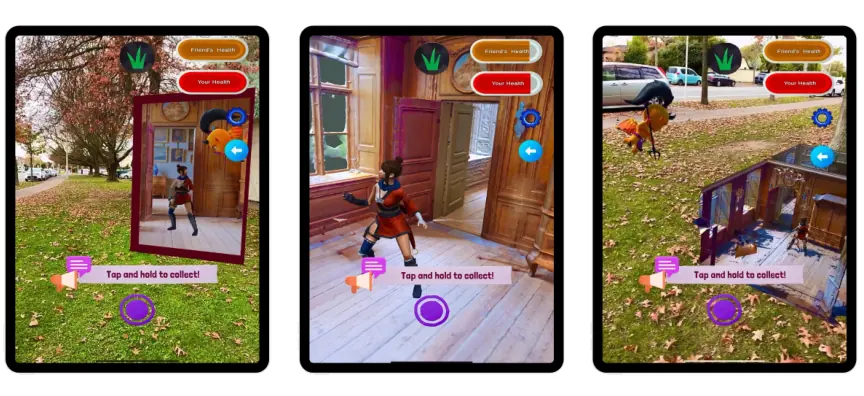
Three tablets showing the same remote room rendered three ways in AR: as a Window portal, as a full-scale Overlay, and as a Tabletop miniature
One remote room, three ways to show it: Window, Overlay and Tabletop (Study 1).
01
Remote space representation

Make the place feel present

When people share a game across distance, the remote place is the game board. How you show it decides whether players feel they are in it, or looking at a picture of it.

We compared three techniques. Showing the remote room as a real-world-scale Overlay around the player produced the strongest sense of “being there” and of knowing where you are in the space. A Window portal felt like the remote place extending into your own, which makes it a natural doorway between locations. A Tabletop miniature gave a useful strategic overview — but a detached one.

Evidence: Study 1 · 30 participants · Entertainment Computing (Elsevier), 2025

Do

  • Use a real-world-scale Overlay when you want presence and self-location
  • Use Window “portals” as the interface for passing resources between locations
  • Ground the remote space in high-fidelity 3D scans of the real environment

Avoid

  • Reaching for a tabletop miniature when players need to feel present — it gives overview, not immersion
  • Treating the remote place as a backdrop rather than the space players act in
02
Player interaction & coordination

Lightweight presence beats fidelity

It's tempting to spend the budget on realistic avatars. In a remote multiplayer AR hide-and-seek game, a minimal cue — a view frustum showing where the remote player was looking — strengthened social connection and coordinated players as effectively as far heavier embodiment, without avatars or video.

AR shifted how people played, too: players made use of mid-air and vertical space. Design for it, because they will find it.

Evidence: Study 2 · 60 participants · IEEE VR 2025 and Multimodal Technologies and Interaction (MDPI), 2025

Do

  • Show the remote player's viewpoint in real time
  • Pair visual cues with voice
  • Test minimal orientation cues, like a view frustum, before investing in avatars
  • Design play spaces with vertical and mid-air positions in mind

Avoid

  • Spending on high-fidelity avatars or video before simple cues have been tested
  • Designing only at ground level
03
AR mechanics & constraints

Make AR a core mechanic

If players can switch AR off without changing the game, AR is decoration. When AR was built into the gameplay loop — several remotely anchored objects, real-time manipulation, and time pressure — strategic search behaviour and engagement deepened.

The condition is clear feedback and well-calibrated constraints. Time pressure that stretches players works; time pressure that overwhelms them doesn't.

Evidence: Study 3 · 38 participants · OzCHI 2025 (ACM)

Do

  • Embed AR in the gameplay loop, so the game changes if AR is removed
  • Anchor several objects remotely and let players manipulate them in real time
  • Calibrate time pressure in playtests until it stretches without overwhelming

Avoid

  • AR as an optional visual layer
  • Constraints tuned on paper rather than with real players
04
Engagement & spatial decisions

Guide without removing the challenge

Players new to shared AR get disoriented early. Subtle feedback — such as particle trails marking where objects were swapped — helped them stay oriented while leaving the discovery to them.

Good onboarding reduces that early confusion. And because players move through physical space, their safety is part of the design, not an afterthought.

Evidence: Studies 2 and 3 · synthesised in the PhD thesis, University of Canterbury, 2025

Do

  • Use subtle feedback, like particle trails, to support orientation
  • Invest in onboarding for the first minutes of play
  • Design for safe physical movement: space, pace and awareness of surroundings

Avoid

  • Guidance so strong it solves the puzzle for players
  • Leaving safety to a warning screen
Before you build

A twelve-question checklist

Run through it at concept stage, and again before your first playtest. Every “no” is a design decision worth making on purpose.

  1. Would the game change if AR were switched off? (It should.)
  2. Where presence matters, is the remote place shown at real-world scale?
  3. Is there a clear, intuitive way to pass things between locations?
  4. Is the remote space built from real scans rather than generic stand-ins?
  5. Can players see, in real time, where remote teammates are looking?
  6. Can players talk to each other?
  7. Have simple presence cues been tested before investing in avatars?
  8. Do levels use vertical and mid-air space?
  9. Are there several remotely anchored objects players can manipulate live?
  10. Has time pressure been calibrated with real players?
  11. Does feedback support orientation without giving answers away?
  12. Is there onboarding for the first minutes — and a plan for safe movement?
Printable edition

Take the playbook to your team.

A typeset PDF with all four principles, the do/avoid lists, the checklist and full sources — made for printing and pinning above a desk. Tell me where to send new editions and I'll unlock the download.

Prefer not to share your email? Everything is on this page — the PDF is just the printable version.

Sources

Check the evidence

Cite as: Wickramasinghe, Y. S. (2026). The location-based AR design playbook: Four evidence-based principles for AR that connects people across distance. https://www.yasassri.me/playbook.html

Apply it

Want these principles applied to your project?