01Home 02Research 03Teaching 04Students 05Products 06News 07Writing 08Platform New 09Contact
Code Champ 2026 · Workshop 07

Augmented reality, running on the phone in your hand.

No app. No download. No account. Open this page on your phone, point it at your floor, and put something that isn't there into your room. Then scroll on to see how the same ideas turn into real research and real games.

Companion page for Workshop 07 — Augmented Reality & Game Development, part of Code Champ 2026 “Code Your World”, run by E3 (Computer Science) with CPS, SLAAS and the IEEE Computer Society Sri Lanka Chapter.

01

Leave something floating in your room.

Tap to hang a crystal in the air, turn away, then turn back and find it again. It runs entirely inside your browser — your camera feed never leaves your phone, there is no server, no upload, and nothing is recorded.

Tap anywhere to leave a crystal in the air.

Ready when you are

Best on a phone. You'll be asked for motion access and then camera access — say yes to both. Nothing is uploaded or recorded.

Checking what your phone can do…

What am I looking at?

Your camera becomes the background AR always starts here. The “reality” half of augmented reality is just a live camera picture.
The gyroscope tracks which way you're facing Every phone has one. It reports the phone's tilt and turn hundreds of times a second — the same sensor that rotates your photos.
The crystal is pinned to a direction, not to the screen When you tap, the crystal is stored as a point in the world around you. As you turn, the maths works out where that point should now appear on screen — so it stays put while everything else moves.
Turn away, turn back, collect it That tiny loop — place it, lose it, find it again — is the seed of every location-based AR game, including the hide-and-seek one further down this page.
What this demo deliberately doesn't do: it has no idea where your floor is, and virtual things won't hide behind real furniture. Those need depth sensing and ARCore-class hardware. Everything you see here is a camera, a gyroscope and about 20 KB of code — which is exactly the point.

Will it work on my phone?

The page checks your device and gives you the best mode it can run. You will always get something — nobody is left with a blank screen.

1
AR with motion tracking Any phone with a rear camera and a gyroscope — iPhone on iOS 13+, or essentially any Android from the last decade. No ARCore, no app, no install. This is what almost everyone gets.
2
AR with drag to look If motion access is declined or the sensor stays silent, the camera still works — you swipe across the picture to look around instead. Same crystals, same game.
3
3D demo — no camera needed No camera, or permission declined? The same scene runs as an animation you can drag to look around. Works on a laptop too.
Two things that trip people up. Your phone will ask twice — once for motion, once for the camera. Say yes to both; neither leaves your device. And on iPhone, motion access has a master switch: if you're never asked, turn it on at Settings → Apps → Safari → Motion & Orientation Access, then reload this page. Open the link in Safari or Chrome directly — camera access is blocked inside in-app browsers like Facebook, Instagram or WhatsApp.
02

How a phone turns a camera into a window.

Nothing is really floating in your room. The phone is drawing a 3D object into a live photo, sixty times a second, from exactly the right angle. Here is the trick, drawn to scale.

The phone is not a magic mirror — it is a camera plus arithmetic. The dashed cone is what the camera can see. The crystal is not in the room; it only exists as three numbers, and the phone works out where those numbers should land on the screen.
The camera takes a picture Sixty times a second. This becomes the background — the “reality” half.
The sensors say which way you're pointing The gyroscope reports the phone's tilt and turn. Better AR systems also watch the picture itself to work out where you have walked, not just where you have turned.
The object is stored as a place, not a pixel “2.2 metres that way, at eye height.” Because it is stored in the room's coordinates rather than the screen's, it does not slide about when you move.
Maths puts it back on the screen Knowing where you are and where the object is, the phone calculates the exact pixel it should appear at, then draws it on top of the photo. Repeat sixty times a second and your eyes call it real.

Two tricks that make it convincing

The demo at the top of this page skips both of these — they need more capable hardware. Tap the buttons to see what each one actually does.

Mesh detection — the phone learns the shape of the room. It builds an invisible skin of triangles over whatever it sees. Once that exists, virtual things can rest on real surfaces, roll off them and bump into them instead of hovering in a void.
Occlusion — real things get to block virtual ones. The crystal is standing behind the box, so you should only see its tip. Turn occlusion off and it floats in front of the box instead — the single fastest way to make AR look fake.
03

Five ideas that make AR feel real.

The demo above is deliberately simple. Five more layers sit between it and a real AR game — and the first four each have a clip from my research further down, recorded on an ordinary phone.

Layer 01

Understanding the room

The phone builds an invisible 3D mesh of the surfaces around you — walls, floors, tables. Once it has that mesh, virtual things can rest on real surfaces and bounce off them.

Layer 02

Knowing what things are

Beyond shape, the phone can label what it sees — sky, ground, buildings — and work out how far away each pixel is. That's what lets a virtual character walk behind a real tree.

Layer 03

Anchoring to a place

Tie the content to a real location and AR stops being a party trick. The same virtual object appears in the same physical spot every time anyone visits.

Layer 04

Sharing the illusion

Two phones, one agreed coordinate system. Both players see the same virtual object in the same real place at the same time — the foundation of every multiplayer AR game.

Layer 05

Giving it rules

Add a goal, a score and another player, and the technology becomes a game. This is where the research on this page lives.

In the session

We build up from here

You don't need any of this on day one. Start with a camera and a cube — everything else is layers you add later.

04

The same ideas, actually running.

Four experiments from my PhD work at HIT Lab NZ, built with the Niantic Lightship SDK (since renamed the Niantic Spatial SDK). Each card starts with a short, low-bandwidth preview — tap it and it plays straight away. The full-length version opens in a new tab when you want it.

Experiment 01 · Meshing

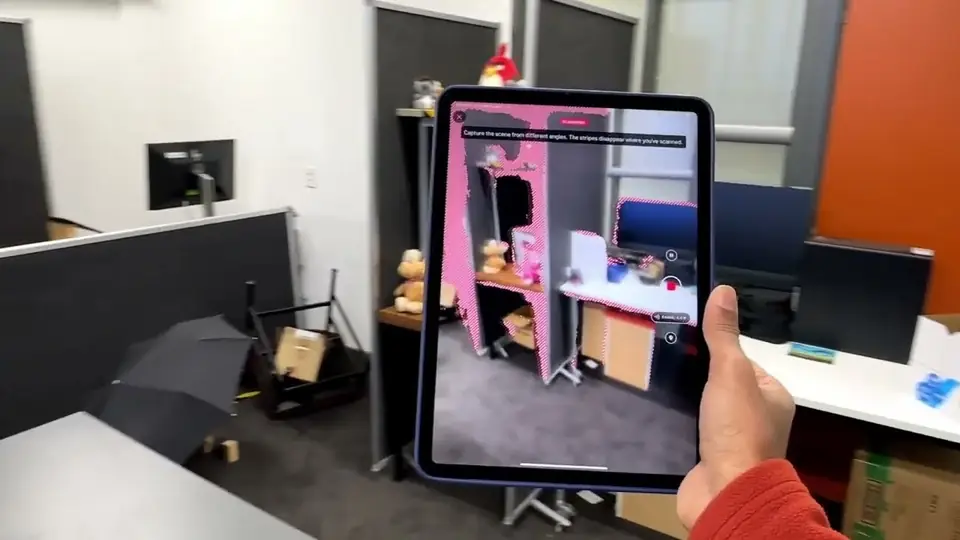
The phone maps the room

Watch the coloured surface crawl over the chairs and floor. That mesh is the phone working out the shape of the room in real time — and the basketball you see rolls across it like it would across the real floor.
Experiment 02 · Segmentation, planes & occlusion

The phone labels what it sees

The sky gets recoloured because the phone has identified it as sky. The same understanding places the character on flat ground and lets real objects pass in front of virtual ones — the effect called occlusion.

Experiment 03 · Location-based AR

Content that belongs to a place

Here the virtual content is tied to the real walkway rather than to the screen. Walk away and it stays behind; come back and it's still there. This is the mechanic behind every “go outside and play” AR game.

Experiment 04 · Shared AR

Two phones, one shared world

Look closely: both phones show the same virtual chair standing in the same spot in the same real room. Getting two devices to agree on where “here” is turns out to be one of the hardest and most interesting problems in AR.

Previews are ~250 KB each and only download when you tap them. Full clips are hosted on University of Canterbury OneDrive and are much larger — save those for Wi-Fi.

05

Now make it a game: AR hide-and-seek.

Everything above is plumbing. This is what it was for — a hide-and-seek game where one player hides virtual objects in another player's room, from a different building entirely.

Title frame of the IEEE VR 2025 video on a multiplayer location-based AR hide-and-seek game

Augmented Hide-and-Seek — presented at IEEE VR 2025. The full study is open access in Multimodal Technologies and Interaction ↗.

How the game works

The Hider sees the Seeker's room The Seeker's space is scanned and sent across as a 1:1 AR representation, so the Hider can look around a room they have never physically been in.
The Hider hides a virtual object They pick an object and place it somewhere awkward — behind a chair, above a shelf, tucked in a corner.
The Seeker hunts for it Back in the real room, the Seeker walks around holding up their phone, searching the physical space for something that only exists virtually.
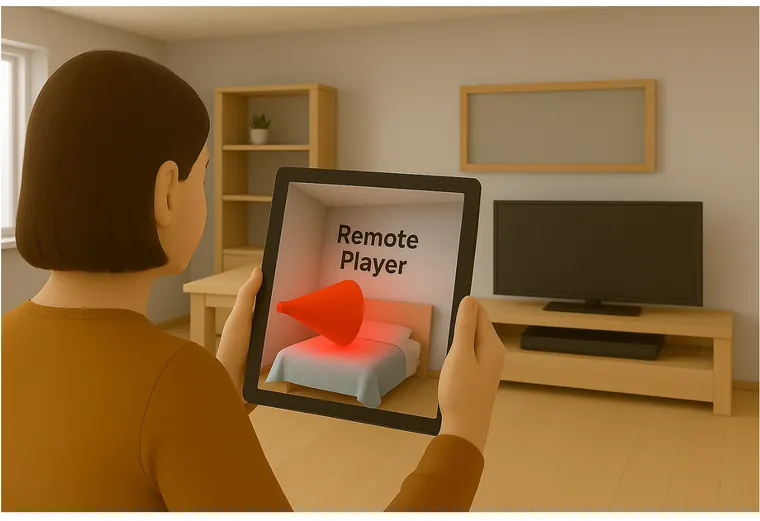
They talk each other through it Live voice chat carries “hotter, colder” hints, and a cone of light shows the Hider exactly where the Seeker is looking.

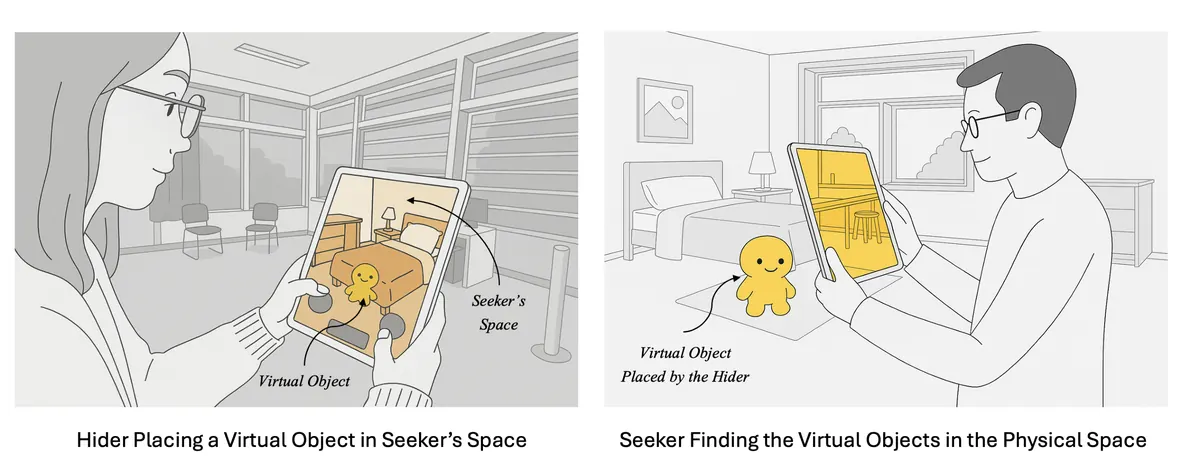
Across 60 participants, playing in AR changed how people searched — they used vertical and mid-air space that never comes into play in the real-world version of the game.

Two-panel illustration: on the left a Hider places a small virtual toy into a view of the Seeker's room on a tablet; on the right the Seeker holds up a tablet in that real room and finds the same virtual toy
The whole game in one picture. The Hider (left) drops a virtual object into a live representation of a room they are not in. The Seeker (right) stands in that real room and has to find it through their screen.
Illustration of a player holding a tablet showing a remote room, with a red cone of light marking where the remote player is standing and looking
Seeing where your partner is looking. That red cone is the Seeker's field of view, drawn into the Hider's screen. No avatar, no video — one simple cue, and players suddenly feel like they're in the room together.
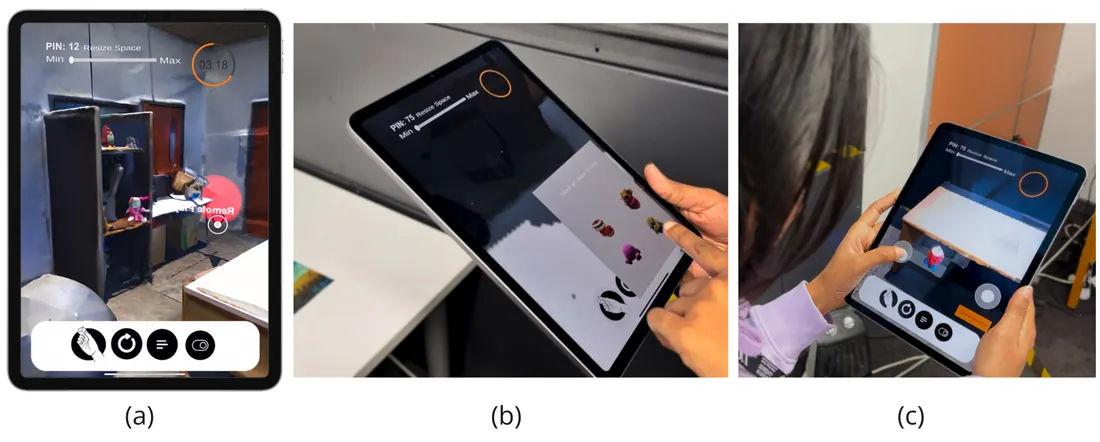
Three screenshots of the Hider's tablet: a one-to-one AR view of the Seeker's room, an inventory of virtual objects to choose from, and on-screen thumbsticks used to position the chosen object
What the Hider actually does. (a) A 1:1 AR view of the Seeker's room. (b) Pick an object from the inventory. (c) Nudge it into a hiding place with on-screen sticks.
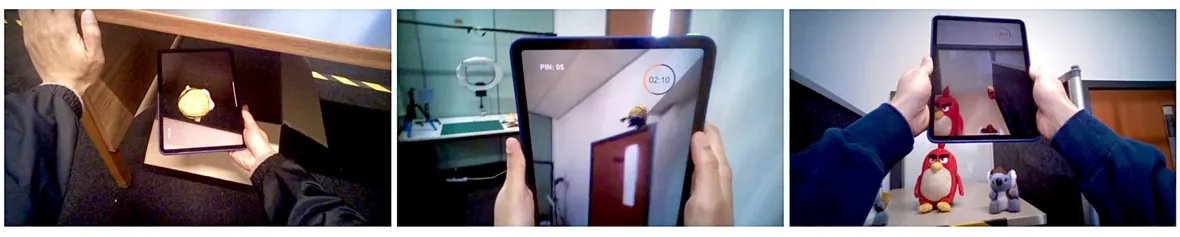
Three photographs of players holding tablets up in a real room, discovering virtual objects hidden on a shelf, beside a door and on a desk
And what the Seeker does. Real people, real rooms, holding a screen up to furniture to find something that only exists in software.

Figures from Wickramasinghe, Lukosch, Everett & Lukosch (2025), Multimodal Technologies and Interaction 9(8), 79 — open access, CC BY 4.0.

06

Designing it before building it.

The most useful lesson from years of AR research is unglamorous: sketch the rules first. Code is the last step, not the first.

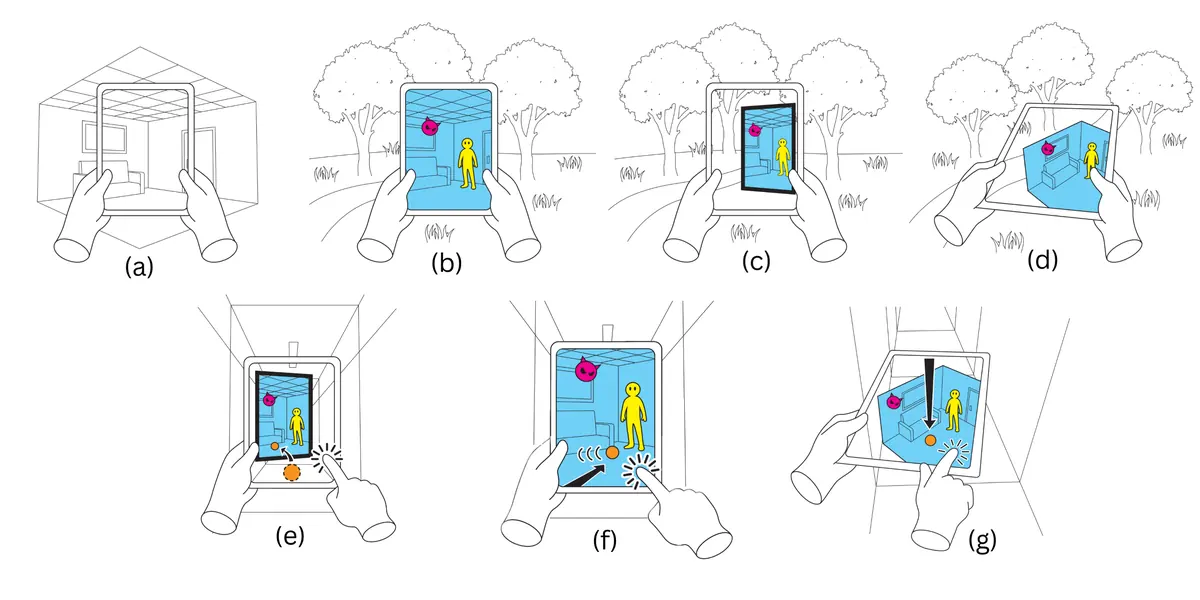
Seven-panel line diagram: scanning a room, then representing that scanned space in window, tabletop and overlay modes, and sharing virtual objects between two spaces
Three ways to show someone else's room. A space is scanned (a), then shown to the other player as a window into it (b), a tabletop miniature (c), or overlaid on their own surroundings (d). Panels (e–g) show virtual objects being passed between the two spaces. Which one you choose changes how present the other place feels — that was the finding, and it came from sketching, not coding.
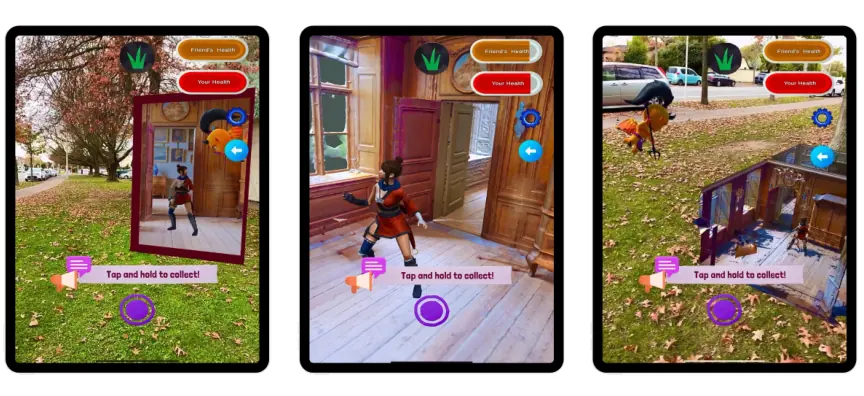
Three phone screenshots side by side showing the same AR game in window mode, overlay mode and tabletop mode
The same three modes, running on a phone. Left to right: window, overlay, tabletop. The player's task is identical in all three — only the presentation changes.
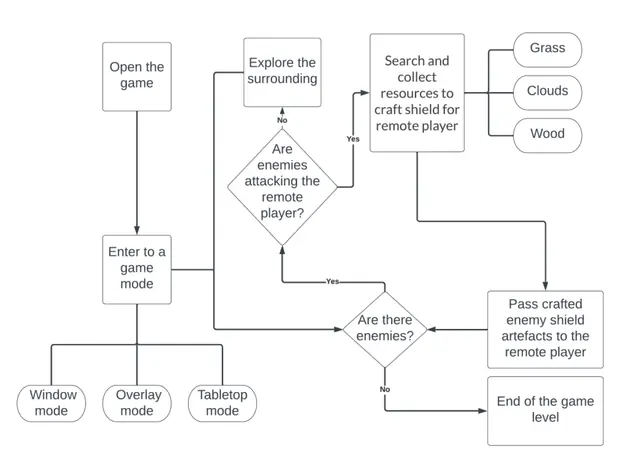
Flow chart of the game scenario, from opening the game and choosing a mode through exploring, collecting grass, clouds and wood, crafting a shield and passing it to the remote player
The whole game on one page. Before a line of code exists, the rules are a flow chart: what the player can do, what the game asks next, and how a round ends.
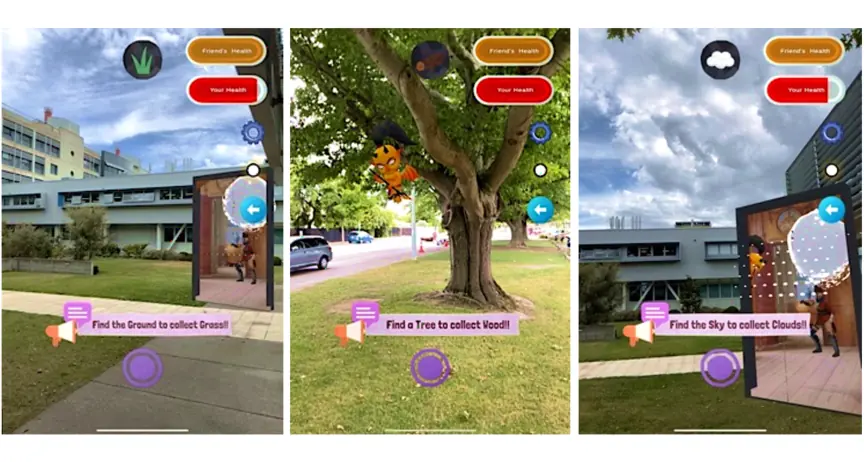
Three phone screenshots prompting the player to find the ground to collect grass, find a tree to collect wood, and find the sky to collect clouds
Rules that need the real world. “Find the Ground”, “Find a Tree”, “Find the Sky” — each task forces the player to physically look at something real. That's the difference between a game with AR and a game that needs AR.

Figures from my PhD research at HIT Lab NZ, University of Canterbury — thesis PDF · all publications.

07

Where to start, honestly.

If today is your first day with AR, here is the order I'd recommend — easiest first, and every one of them is free.

Worth your weekend

The Niantic Spatial SDK

If one thing on this page is worth downloading tonight, it's this. It's the toolkit the four clips above were built with, and it hands you — for free, in an afternoon — the exact capabilities that took research labs years to build. If you've followed an older tutorial and hit a dead end, that's why: Lightship was renamed the Niantic Spatial SDK, and lightship.dev now redirects here.

MeshingRebuilds the room around you as live triangle geometry, in updating chunks — so virtual things can sit on real tables and bounce off real walls.
Depth & occlusionReal-time depth maps, so a virtual character can walk behind a real tree instead of sliding over it. Diagram 2 above, done properly.
Semantics & object detectionThe phone labels what it's looking at — sky, ground, buildings, water — so your content can behave differently depending on where it lands.
Visual Positioning System (VPS)Pins content to a real place to centimetre accuracy by recognising what the camera sees — so it still works where GPS is hopeless, like alleyways and indoors.
Shared ARTwo or more phones agreeing on one coordinate system, seeing the same virtual object in the same real spot. This is the hard part of multiplayer AR, handed to you.
Unity, Swift, Kotlin — and Quest 3Extends Unity's AR Foundation, with native iOS and Android SDKs. Recent releases also bring outdoor VPS and live meshing to Meta Quest 3 through its passthrough camera.

Start here: install the SDK for Unity ↗, open one of the sample projects ↗, and run it on your phone before you write a single line of your own. Seeing occlusion work on your own desk is worth more than any lecture — including mine.

One piece of advice for the session: resist the urge to build a game first. Build a cube that stays put when you walk away. Once that works, everything else is just adding rules.
The session

Workshop 07 — Augmented Reality & Game Development

Part of Code Champ 2026, “Code Your World”, organised by E3 (Computer Science) with the Committee for Popularization of Science (CPS), SLAAS and the IEEE Computer Society Sri Lanka Chapter. Led by Dr. Yasas Sri Wickramasinghe, Postdoctoral Researcher at HIT Lab NZ, University of Canterbury.

Date20 August 2026
Time8:00 – 9:30 PM (Sri Lanka)
FormatOnline via Zoom
LevelComplete beginners welcome
Code Champ 2026 Workshop 07 flyer — Augmented Reality and Game Development with Dr. Yasas Sri Wickramasinghe, 20 August 2026, via Zoom